Rossoctl Identity, Authentication, & Authorization Guide
This comprehensive guide covers all aspects of identity, authentication, and authorization in the Rossoctl platform. Rossoctl implements a Zero-Trust Architecture that combines SPIFFE/SPIRE workload identity, OAuth2 token exchange, and Keycloak identity management to provide secure, scalable, and dynamic authentication for cloud-native AI agents.
In practice, the Authorization Pattern within the Agentic Platform enables:
- Machine Identity Management – replacing static credentials with SPIRE-issued JWTs.
- Secure Delegation – enforcing token exchange to propagate identity across services without excessive permissions.
- Continuous Verification – ensuring authentication and authorization at each step, preventing privilege escalation.
📚 Related Documentation
- Rossoctl Identity Overview - High-level architectural concepts
- AuthBridge Component - Complete end-to-end installation and demo with SPIFFE, Client Registration, and AuthProxy
- Token Exchange Deep Dive - Detailed OAuth2 token exchange flows
- Client Registration Examples - Practical integration examples
- Personas and Roles - Security and identity specialist persona
🏗️ Architecture Overview
Zero-Trust Identity Foundation
Rossoctl's identity architecture is built on three core principles:
- No Implicit Trust - Every request requires explicit authentication and authorization
- Least Privilege Access - Users and workloads receive minimum necessary permissions
- Continuous Verification - Identity and permissions are validated at every interaction
Key Components
| Component | Purpose | Technology |
|---|---|---|
| SPIFFE/SPIRE | Workload Identity & Attestation | Industry-standard workload identity framework |
| Keycloak | Identity Provider & Access Management | OAuth2/OIDC compliant identity server |
| OAuth2 Token Exchange | Secure Token Delegation | RFC 8693 token exchange protocol |
| MCP Gateway | Protocol-Level Authentication | Envoy-based authentication proxy |
| Kubernetes RBAC | Container-Level Authorization | Native Kubernetes access controls |
🔐 SPIFFE/SPIRE Workload Identity
What is SPIFFE/SPIRE?
SPIFFE (Secure Production Identity Framework For Everyone) provides a universal identity control plane for distributed systems. SPIRE is the production-ready implementation that issues and manages SPIFFE identities.
SPIFFE Identity Format
In Rossoctl, workloads receive SPIFFE identities in the following format:
spiffe://{trust-domain}/ns/{namespace}/sa/{service-account}
Examples:
# Slack Research Agent
spiffe://localtest.me/ns/team/sa/slack-researcher

# Weather Tool
spiffe://localtest.me/ns/team/sa/weather-tool

# GitHub Issue Agent
spiffe://apps.cluster-swkz5.dynamic.redhatworkshops.io/ns/team/sa/github-issue-agent

# MCP Gateway Service
spiffe://apps.cluster-swkz5.dynamic.redhatworkshops.io/ns/gateway-system/sa/mcp-gateway
SVID Types
SPIRE issues SPIFFE Verifiable Identity Documents (SVIDs) in two formats:
- X.509 SVID - Certificate-based identity for mTLS
- JWT SVID - Token-based identity for HTTP APIs
JWT SVID Structure:
{
  "sub": "spiffe://localtest.me/ns/team/sa/slack-researcher",
  "aud": "rossoctl",
  "exp": 1735689600,
  "iat": 1735686000,
  "iss": "https://spire-server.spire.svc.cluster.local:8443"
}
SPIRE Environment Validation
To verify SPIRE is properly configured:
1. OIDC Discovery Endpoint
# Check SPIRE OIDC service and
# Verify JWT signing keys
curl http://spire-oidc.localtest.me:8080/keys
2. Tornjak Management Interface
# Access Tornjak UI
open http://spire-tornjak-ui.localtest.me:8080/
3. Workload SVID Validation
# Check if agent has received SVID
kubectl exec -n team deployment/slack-researcher -- ls -la /opt/
# Should show: svid.pem, svid_key.pem, svid_bundle.pem, jwt_svid.token

# Inspect JWT SVID content
kubectl exec -n team deployment/slack-researcher -- cat /opt/jwt_svid.token

# Decode JWT SVID (requires jq)
kubectl exec -n team deployment/slack-researcher -- cat /opt/jwt_svid.token | \
  cut -d'.' -f2 | base64 -d | jq .
🎫 Keycloak Identity Management
Keycloak Architecture in Rossoctl
Keycloak serves as the central identity provider that:
- Manages user identities and authentication
- Issues OAuth2/OIDC tokens
- Enforces role-based access control (RBAC)
- Facilitates token exchange between services
- Validates SPIFFE identities for workload authentication
Realm Configuration
Master Realm is configured with:
- Users: Demo users with different access levels
- Clients: Each agent/tool is a Keycloak client
- Roles: Granular permissions (e.g.,
slack-full-access,github-partial-access) - Scopes: Define token audiences and permissions
Client Types
| Client Type | Authentication | Purpose | Example |
|---|---|---|---|
| Public Client | No secret | Frontend applications | rossoctl-ui |
| Confidential Client | Client secret | Backend services | Traditional services |
| SPIFFE Client | JWT SVID | Workload identity | spiffe://localtest.me/ns/team/sa/slack-researcher |
Demo Users and Access Levels
# Full Access Users
slack-full-access-user:
  password: "password"
  roles: ["slack-full-access", "slack-partial-access"]
  permissions:
    - channels:read
    - channels:history
    - messages:write

# Partial Access Users
slack-partial-access-user:
  password: "password"
  roles: ["slack-partial-access"]
  permissions:
    - channels:read

# GitHub Users
github-full-access-user:
  password: "password"
  roles: ["github-full-access", "github-partial-access"]
  permissions:
    - repos:read
    - issues:write
    - issues:read

github-partial-access-user:
  password: "password"
  roles: ["github-partial-access"]
  permissions:
    - issues:read

# Admin Users
admin:
  password: "admin"
  roles: ["admin", "*"]
  permissions: ["*"]
Keycloak Admin Access
# Access Keycloak Admin Console
# on kind:
open http://keycloak.localtest.me:8080/admin/master/console/
# on OpenShift:
open "https://$(kubectl get route mcp-proxy -n rossoctl-system -o jsonpath='{.status.ingress[0].host}')"

# Get admin credentials from Kubernetes (if different)
kubectl get secret keycloak-initial-admin -n keycloak -o go-template=\
  'Username: {{.data.username | base64decode}}  Password: {{.data.password | base64decode}}{{"\n"}}'
# Example output:
# Username: admin  Password: XyZ1234!
🔄 OAuth2 Token Exchange Flows
Token Exchange Protocol (RFC 8693)
Rossoctl implements OAuth2 Token Exchange to enable secure token delegation across the agent ecosystem. This allows:
- User identity propagation through agent → tool chains
- Least-privilege token scoping
- Audit trails for all access requests
Authentication Flow Stages
📊 Diagrams: The following sequence diagrams illustrate Rossoctl's authentication flows. Each diagram is available as both PNG (for documentation) and SVG (for presentations) in the
docs/diagrams/images/directory. The original Mermaid source files are preserved in collapsible sections below each diagram.
Stage 1: User Authentication
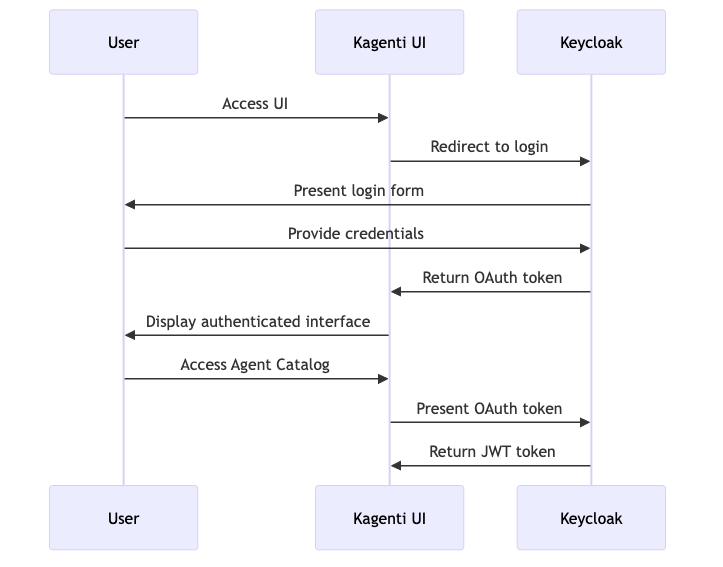
Figure 1: User Authentication Flow - Shows how users authenticate with Rossoctl UI through Keycloak OIDC flow
HTTP Request:
POST /realms/master/protocol/openid-connect/token
Content-Type: application/x-www-form-urlencoded

grant_type=authorization_code
&client_id=rossoctl-ui
&code=<auth_code>
&redirect_uri=http://rossoctl-ui.localtest.me:8080/callback
Response:
{
  "access_token": "eyJ0eXAiOiJKV1Q...",
  "expires_in": 600,
  "scope": "openid profile email",
  "token_type": "Bearer",
  "id_token": "eyJ0eXAiOiJKV1Q..."
}
Stage 2: Keycloak Client Registration Flow (Operator-managed)
Keycloak client registration is now handled by the rossoctl-operator's ClientRegistrationReconciler controller. The controller:
- Reconciles AgentRuntime CRs and applies
rossoctl.io/type: agentortoollabels to target workloads - Reads Keycloak admin credentials from the
keycloak-admin-secretin the operator namespace (rossoctl-system) - Uses the workload's SPIFFE ID as the client identifier
- Registers the client with Keycloak and creates a secret containing client credentials in the agent namespace
This approach provides better security isolation by restricting Keycloak admin credentials to the operator namespace rather than replicating them to every agent namespace.
Stage 3: Agent Token Exchange
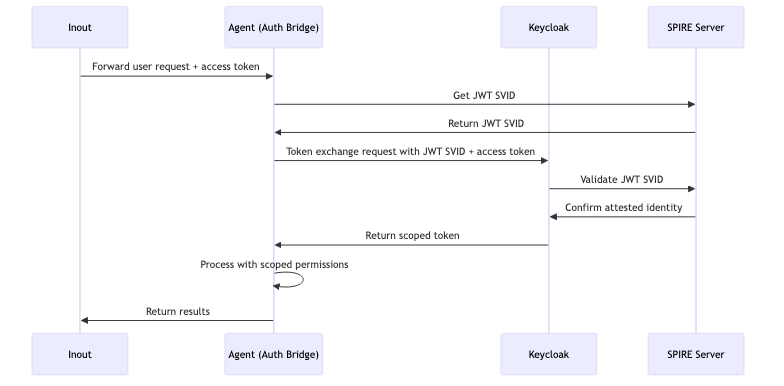
Figure 4: Agent Token Exchange Flow - Demonstrates OAuth2 token exchange between agents and Keycloak using SPIFFE identity
Token Exchange Request:
POST /realms/master/protocol/openid-connect/token
Content-Type: application/x-www-form-urlencoded
Authorization: Bearer <JWT-SVID-AGENT>

grant_type=urn:ietf:params:oauth:grant-type:token-exchange
&subject_token=<USER-JWT-TOKEN>
&subject_token_type=urn:ietf:params:oauth:token-type:access_token
&audience=slack-tool
&client_id=spiffe://localtest.me/ns/team/sa/slack-researcher
Token Exchange Response:
{
  "access_token": "eyJ0eXAiOiJKV1Q...",
  "expires_in": 300,
  "scope": "slack-partial-access",
  "token_type": "Bearer"
}
Stage 4: Internal Tool Access with Delegated Token
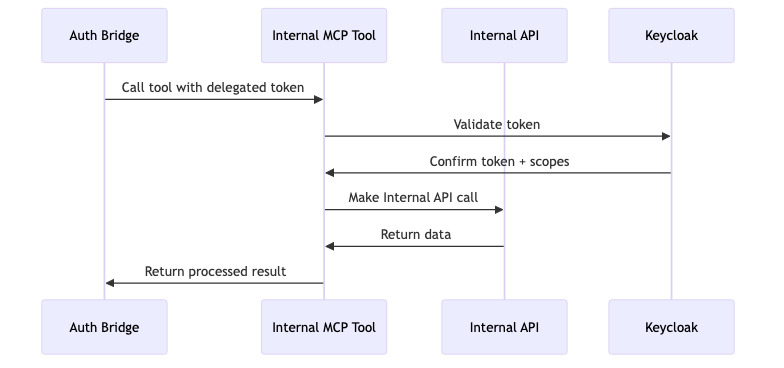
Figure 4: Internal Tool Access Flow - Shows how agents call internal tools using delegated tokens with proper permission validation
JWT Token Structure
User Token:
{
  "sub": "user-123",
  "preferred_username": "slack-full-access-user",
  "aud": "rossoctl-ui",
  "exp": 1735689600,
  "roles": ["slack-full-access", "slack-partial-access"]
}
Agent-Scoped Token (after exchange):
{
  "sub": "user-123",
  "act": {
    "sub": "spiffe://localtest.me/ns/team/sa/slack-researcher"
  },
  "aud": "slack-tool",
  "exp": 1735686900,
  "scope": "slack-full-access"
}
🌐 MCP Protocol Authentication
MCP Gateway Authentication
The MCP Gateway acts as an authentication proxy for all Model Context Protocol communications:
Stage 5: Gateway Authentication Flow
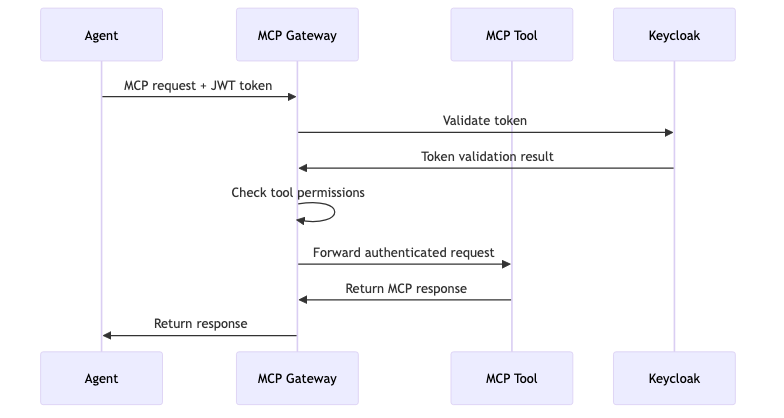
Figure 5: MCP Gateway Authentication Flow - Illustrates authentication flow through the MCP Gateway proxy for Model Context Protocol communications
MCP Authentication Headers
# Agent to Gateway
POST /mcp
Host: mcp-gateway.localtest.me:8080
Authorization: Bearer <JWT-TOKEN>
Content-Type: application/json

{
  "method": "tools/list",
  "params": {}
}
Gateway Configuration
apiVersion: gateway.networking.k8s.io/v1
kind: HTTPRoute
metadata:
  name: slack-tool-route
  labels:
    mcp-server: "true"
spec:
  parentRefs:
  - name: mcp-gateway
    namespace: gateway-system
  hostnames:
  - "slack-tool.mcp.local"
  rules:
  - matches:
    - path:
        type: PathPrefix
        value: /
    filters:
    - type: ExtensionRef
      extensionRef:
        group: rossoctl.dev
        kind: AuthFilter
        name: jwt-validator
    backendRefs:
    - name: slack-tool-mcp
      port: 8000
Tool-Specific Authentication
Slack Tool Authentication
# In Slack MCP Tool
def validate_request(request):
    token = request.headers.get("Authorization", "").replace("Bearer ", "")

    # Validate with Keycloak
    response = requests.get(
        "http://keycloak.keycloak.svc.cluster.local:8080/realms/master/protocol/openid-connect/userinfo",
        headers={"Authorization": f"Bearer {token}"}
    )

    if response.status_code != 200:
        raise AuthenticationError("Invalid token")

    user_info = response.json()
    scopes = user_info.get("scope", "").split()

    # Check permissions
    if "slack-full-access" in scopes:
        return PermissionLevel.FULL
    elif "slack-partial-access" in scopes:
        return PermissionLevel.PARTIAL
    else:
        raise AuthorizationError("Insufficient permissions")
Stage 6: External API Access with Delegated Token and Vault
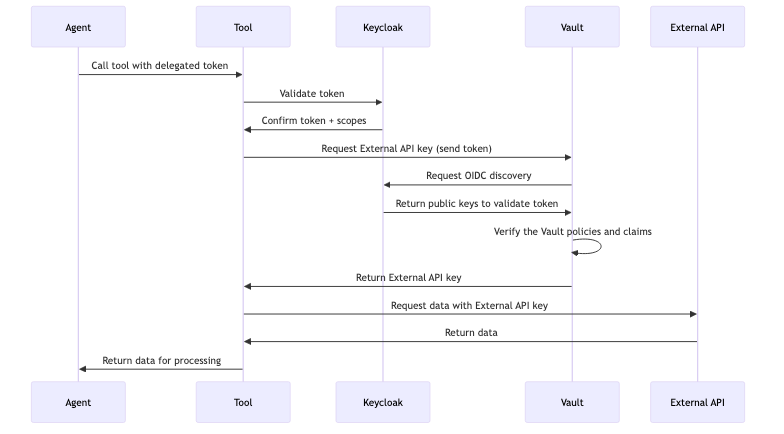
Figure 6: External API Access with Vault Flow - Shows how agents call internal tools using delegated tokens with proper permission validation and the Vault exchanges this token for external API key for accessing external APIs
JWT Token Structure
User Token:
{
  "sub": "user-123",
  "preferred_username": "slack-full-access-user",
  "aud": "rossoctl-ui",
  "exp": 1735689600,
  "roles": ["slack-full-access", "slack-partial-access"]
}
Agent-Scoped Token (after exchange):
{
  "sub": "user-123",
  "act": {
    "sub": "spiffe://localtest.me/ns/team/sa/slack-researcher"
  },
  "aud": "slack-tool",
  "exp": 1735686900,
  "scope": "slack-full-access"
}
🛠️ Practical Implementation Guide
Client Registration Process
Operator-Managed Registration
Keycloak client registration is handled automatically by the rossoctl-operator's ClientRegistrationReconciler. When you deploy an agent or tool:
- Create an AgentRuntime CR targeting the workload with
spec.type: agentorspec.type: tool - The operator reconciles the AgentRuntime, applies the
rossoctl.io/typelabel to the target workload, and registers it with Keycloak using:- Client ID pattern depends on whether SPIFFE is enabled:
- SPIFFE disabled:
namespace/workload-name(e.g.,team1/slack-researcher) - SPIFFE enabled:
spiffe://trustdomain/ns/namespace/sa/serviceaccount(e.g.,spiffe://localtest.me/ns/team1/sa/slack-researcher-sa)
- SPIFFE disabled:
- Keycloak admin credentials from the
keycloak-admin-secretin the operator namespace
- Client ID pattern depends on whether SPIFFE is enabled:
- The operator creates a secret in the agent namespace containing client credentials
This is fully automatic and requires no manual intervention or init containers.
Reading Client Credentials in Application Code
Applications can read the client credentials from the secret created by the operator:
import os

# Read client credentials from operator-created secret
# Mounted at /secrets by the platform
client_id = open("/secrets/client-id.txt").read().strip()
client_secret = open("/secrets/client-secret.txt").read().strip()

# Use credentials for OAuth2 flows
keycloak_url = os.getenv("KEYCLOAK_URL", "http://keycloak.keycloak.svc.cluster.local:8080")
realm = os.getenv("KEYCLOAK_REALM", "master")
Token Exchange Implementation
Agent-Side Token Exchange
import requests
import os

def exchange_token_for_tool(user_token: str, tool_audience: str) -> str:
    """Exchange user token for tool-scoped token."""

    # Read SPIFFE JWT SVID
    with open("/opt/jwt_svid.token", "r") as f:
        jwt_svid = f.read().strip()

    # Get client ID from SVID
    payload = jwt.decode(jwt_svid, options={"verify_signature": False})
    client_id = payload["sub"]

    # Token exchange request
    token_exchange_data = {
        "grant_type": "urn:ietf:params:oauth:grant-type:token-exchange",
        "subject_token": user_token,
        "subject_token_type": "urn:ietf:params:oauth:token-type:access_token",
        "audience": tool_audience,
        "client_id": client_id
    }

    response = requests.post(
        "http://keycloak.keycloak.svc.cluster.local:8080/realms/master/protocol/openid-connect/token",
        data=token_exchange_data,
        headers={
            "Authorization": f"Bearer {jwt_svid}",
            "Content-Type": "application/x-www-form-urlencoded"
        }
    )

    if response.status_code != 200:
        raise Exception(f"Token exchange failed: {response.text}")

    return response.json()["access_token"]

# Usage example
user_token = request.headers.get("Authorization", "").replace("Bearer ", "")
tool_token = exchange_token_for_tool(user_token, "slack-tool")

# Call tool with scoped token
tool_response = requests.post(
    "http://slack-tool.team.svc.cluster.local:8000/mcp",
    headers={"Authorization": f"Bearer {tool_token}"},
    json={"method": "tools/list"}
)
🌉 AuthBridge Component
The AuthBridge Component provides a complete, hands-on implementation of Rossoctl's identity and authorization patterns. It combines Client Registration and AuthProxy to demonstrate the full zero-trust authentication flow.
What AuthBridge Demonstrates
| Capability | Description |
|---|---|
| Automatic Workload Identity | Pod registers itself with Keycloak using SPIFFE ID |
| Inbound JWT Validation | Validates incoming token signature, expiration, and issuer via JWKS; optionally validates audience. Returns 401 for invalid tokens. |
| Transparent Token Exchange | Sidecar exchanges outbound tokens for correct target audience via Keycloak |
| Target Service Validation | Target validates token has correct audience |
AuthBridge Architecture
┌─────────────────────────────────────────────────────────────────────────────────┐
│  1. Operator reconciles AgentRuntime CRs and labels target workloads            │
│  2. Operator registers client with Keycloak (using admin credentials from       │
│     operator namespace) and creates credentials secret in agent namespace       │
│  3. (If SPIFFE enabled) SPIFFE Helper obtains SVID from SPIRE Agent             │
│  4. Agent gets token from Keycloak using credentials from secret                │
│  5. Agent sends request to target with token                                    │
│  6. Envoy+ext-proc intercepts: validates token signature, expiration, issuer    │
│     via JWKS (returns 401 if invalid), then exchanges token for target audience │
│  7. Target receives request with exchanged token and validates audience         │
└─────────────────────────────────────────────────────────────────────────────────┘

  Operator                   SPIRE Agent           Keycloak              Target
       │                         │                     │                    │
       │ 1. Watch workload       │                     │                    │
       │ 2. Register client      │                     │                    │
       ├─────────────────────────┼────────────────────►│                    │
       │                         │                     │                    │
       │ Create credentials      │                     │                    │
       │ secret in agent ns      │                     │                    │
       │                         │                     │                    │
       │              ┌─────────┐│  3. Get SVID        │                    │
       │              │ SPIFFE  ││◄────────────────────┤                    │
       │              │ Helper  ││                     │                    │
       │              └─────────┘│                     │                    │
       │                    │    │                     │                    │
       │              ┌─────────┐│                     │                    │
       │              │  Agent  ││  4. Get token       │                    │
       │              │         ││────────────────────►│                    │
       │              │         ││◄────────────────────│                    │
       │              │         ││  (aud: agent's ID)  │                    │
       │              │         ││                     │                    │
       │              │         ││  5. Request + token │                    │
       │              │         ││─────────────────────┼───────────────────►│
       │              └─────────┘│                     │                    │
       │                    │    │                     │                    │
       │         ┌──────────────┐│                     │                    │
       │         │ Envoy+ext-pr ││  6. Validate &      │                    │
       │         │              ││     Exchange token  │                    │
       │         │              ││────────────────────►│                    │
       │         │              ││◄────────────────────│                    │
       │         │              ││  (aud: target)      │                    │
       │         │              ││─────────────────────┼───────────────────►│
       │         └──────────────┘│                     │  7. Validate aud   │
       │                         │                     │       "authorized" │
AuthBridge Components
| Component | Type | Purpose |
|---|---|---|
| Rossoctl Operator | Controller | Reconciles AgentRuntime CRs, applies rossoctl.io/type labels to target workloads, registers them as OAuth clients in Keycloak, and creates credentials secrets in agent namespaces |
| SPIFFE Helper | Container | (Optional, when SPIFFE enabled) Obtains SVID from SPIRE Agent for workload identity |
| Envoy + Go Processor (Ext Proc) | Sidecar | Intercepts traffic in both directions: inbound — validates JWT (signature, expiration, issuer, optional audience) via JWKS, returns 401 for invalid tokens; outbound — exchanges tokens for target audience via Keycloak |
Note: Client registration is fully automatic. The operator reads Keycloak admin credentials from
keycloak-admin-secretin the operator namespace (not from agent namespaces), providing better security isolation.
Hands-On Demos
For step-by-step AuthBridge demos with real working examples, see:
- AuthBridge Weather Demo — Complete end-to-end example showing token exchange between a weather agent and weather tool
- AuthBridge Documentation — Component documentation and additional examples
AuthBridge Documentation
For complete documentation, see:
- AuthBridge README - Full demo instructions
- AuthProxy - Token validation and exchange proxy
Note: The AuthBridge demo in cortex includes client-registration components for demonstration purposes. In production Rossoctl deployments, client registration is handled by the rossoctl-operator controller.
🔍 Troubleshooting & Validation
Common Issues and Solutions
1. SPIRE Agent Not Receiving SVID
Symptoms:
kubectl exec -n team deployment/slack-researcher -- ls /opt/
# Missing: svid.pem, jwt_svid.token
Diagnosis:
# Check SPIRE agent logs
kubectl logs -n spire daemonset/spire-agent

# Check workload registration
kubectl exec -n spire deployment/spire-server -- \
  /opt/spire/bin/spire-server entry show

# Verify node attestation
kubectl exec -n spire deployment/spire-server -- \
  /opt/spire/bin/spire-server agent list
Solutions:
- Ensure agent namespace has correct labels:
shared-gateway-access=true - Verify SPIRE server can reach Kubernetes API
- Check workload selector configuration
2. Token Exchange Failing
Symptoms:
{
  "error": "invalid_client",
  "error_description": "Client authentication failed"
}
Diagnosis:
# Check client registration in Keycloak
curl -H "Authorization: Bearer $ADMIN_TOKEN" \
  "http://keycloak.localtest.me:8080/admin/realms/master/clients" | \
  jq '.[] | select(.clientId | contains("spiffe"))'

# Verify JWT SVID format
kubectl exec -n team deployment/slack-researcher -- \
  cat /opt/jwt_svid.token | cut -d'.' -f2 | base64 -d | jq .
Solutions:
- Verify client is registered with correct SPIFFE ID
- Ensure JWT SVID audience matches Keycloak expectations
- Check token exchange permissions in Keycloak client configuration
3. MCP Gateway Authentication Issues
Symptoms:
{
  "error": "authentication_failed",
  "message": "Invalid or missing authorization header"
}
Diagnosis:
# Check gateway logs
kubectl logs -n gateway-system deployment/mcp-gateway-controller

# Test direct tool access (bypassing gateway)
curl -H "Authorization: Bearer $TOKEN" \
  http://slack-tool.team.svc.cluster.local:8000/mcp

# Check HTTPRoute configuration
kubectl get httproute slack-tool-route -o yaml
Solutions:
- Verify HTTPRoute has correct authentication filters
- Ensure tool is properly registered with gateway
- Check token format and expiration
Debugging Commands
SPIRE Debugging
# List all SPIRE entries
kubectl exec -n spire deployment/spire-server -- \
  /opt/spire/bin/spire-server entry show

# Check SPIRE server health
kubectl exec -n spire deployment/spire-server -- \
  /opt/spire/bin/spire-server healthcheck

# Validate specific workload SVID
SPIFFE_ID="spiffe://localtest.me/ns/team/sa/slack-researcher"
kubectl exec -n spire deployment/spire-server -- \
  /opt/spire/bin/spire-server entry show -spiffeID $SPIFFE_ID
Keycloak Debugging
# Get admin token
ADMIN_TOKEN=$(curl -sX POST \
  -d "client_id=admin-cli" \
  -d "username=admin" \
  -d "password=admin" \
  -d "grant_type=password" \
  "http://keycloak.localtest.me:8080/realms/master/protocol/openid-connect/token" | \
  jq -r .access_token)

# List all clients
curl -H "Authorization: Bearer $ADMIN_TOKEN" \
  "http://keycloak.localtest.me:8080/admin/realms/master/clients" | jq .

# Check specific client configuration
CLIENT_ID="spiffe://localtest.me/ns/team/sa/slack-researcher"
curl -H "Authorization: Bearer $ADMIN_TOKEN" \
  "http://keycloak.localtest.me:8080/admin/realms/master/clients?clientId=${CLIENT_ID}" | jq .

# Validate user token
USER_TOKEN="eyJ0eXAiOiJKV1Q..."
curl -H "Authorization: Bearer $USER_TOKEN" \
  "http://keycloak.localtest.me:8080/realms/master/protocol/openid-connect/userinfo"
Token Validation
# Decode JWT without verification (for debugging)
decode_jwt() {
  echo $1 | cut -d'.' -f2 | base64 -d | jq .
}

# Usage
TOKEN="eyJ0eXAiOiJKV1Q..."
decode_jwt $TOKEN

# Validate token expiration
check_token_expiry() {
  local token=$1
  local exp=$(echo $token | cut -d'.' -f2 | base64 -d | jq -r .exp)
  local now=$(date +%s)

  if [ $exp -gt $now ]; then
    echo "Token valid for $((exp - now)) seconds"
  else
    echo "Token expired $((now - exp)) seconds ago"
  fi
}

check_token_expiry $TOKEN
🛡️ Security Best Practices
Production Security Checklist
SPIRE Configuration
- Enable SPIRE server HA (multiple replicas)
- Use persistent storage for SPIRE server database
- Configure proper node attestation (not k8s-sat in production)
- Enable SPIRE server TLS with proper certificates
- Implement SPIRE server access controls
- Set appropriate SVID TTL values (< 1 hour recommended)
- Enable SPIRE audit logging
Keycloak Security
- Change default admin credentials
- Enable HTTPS for all Keycloak endpoints
- Configure proper session timeouts
- Set up backup and recovery procedures
- Enable audit logging
- Implement brute force protection
- Configure proper CORS policies
- Use strong client secrets for confidential clients
Token Security
- Set short token lifetimes (5-15 minutes)
- Implement token refresh mechanisms
- Use secure token storage (never in logs)
- Validate all token claims (aud, exp, iat)
- Implement proper token revocation
- Use HTTPS for all token exchanges
- Monitor for token abuse patterns
Network Security
- Use mTLS between all internal services
- Implement network policies to restrict traffic
- Configure ingress with proper TLS termination
- Use service mesh for additional security layers
- Monitor all authentication events
- Implement rate limiting on auth endpoints
Security Monitoring
Key Metrics to Monitor
# Authentication Metrics
- authentication_requests_total
- authentication_failures_total
- token_exchange_requests_total
- token_validation_failures_total
- spire_svid_issuance_total
- keycloak_login_attempts_total

# Security Alerts
- High authentication failure rates
- Unusual token exchange patterns
- SPIRE attestation failures
- Expired certificate usage attempts
- Suspicious user agent patterns
Audit Log Configuration
# SPIRE Server Audit
apiVersion: v1
kind: ConfigMap
metadata:
  name: spire-server-config
data:
  server.conf: |
    log_level = "INFO"
    audit_log_enabled = true
    audit_log_path = "/var/log/spire-audit.log"

# Keycloak Audit
apiVersion: v1
kind: ConfigMap
metadata:
  name: keycloak-config
data:
  keycloak.conf: |
    spi-events-listener-jboss-logging-success-level=info
    spi-events-listener-jboss-logging-error-level=warn
📋 Quick Reference
Essential URLs
# Keycloak Admin Console
http://keycloak.localtest.me:8080/admin/master/console/

# Tornjak UI
http://spire-tornjak-ui.localtest.me:8080/

# Rossoctl UI
http://rossoctl-ui.localtest.me:8080/

# MCP Gateway
http://mcp-gateway.localtest.me:8080/mcp
Default Credentials
# Keycloak Admin — run ./.github/scripts/local-setup/show-services.sh for actual credentials

# Demo Users
slack-full-access-user: password
slack-partial-access-user: password
github-full-access-user: password
github-partial-access-user: password
Common SPIFFE IDs
Using local kind:
# Agents
spiffe://localtest.me/ns/team/sa/slack-researcher
spiffe://localtest.me/ns/team/sa/weather-service
spiffe://localtest.me/ns/team/sa/github-issue-agent

# Tools
spiffe://localtest.me/ns/team/sa/slack-tool
spiffe://localtest.me/ns/team/sa/weather-tool
spiffe://localtest.me/ns/team/sa/github-tool

# Infrastructure
spiffe://localtest.me/ns/gateway-system/sa/mcp-gateway
spiffe://localtest.me/ns/rossoctl-system/sa/operator
Using OpenShift:
# Agents
spiffe://apps.cluster-swkz5.dynamic.redhatworkshops.io/ns/team/sa/slack-researcher
spiffe://apps.cluster-swkz5.dynamic.redhatworkshops.io/ns/team/sa/weather-service
spiffe://apps.cluster-swkz5.dynamic.redhatworkshops.io/ns/team/sa/github-issue-agent
Token Exchange Endpoints
# Keycloak Token Endpoint
POST http://keycloak.keycloak.svc.cluster.local:8080/realms/master/protocol/openid-connect/token

# User Info Endpoint
GET http://keycloak.keycloak.svc.cluster.local:8080/realms/master/protocol/openid-connect/userinfo

# Token Introspection
POST http://keycloak.keycloak.svc.cluster.local:8080/realms/master/protocol/openid-connect/token/introspect
📚 Additional Resources
Standards and Specifications
- RFC 8693: OAuth 2.0 Token Exchange - Token exchange specification
- SPIFFE Specification - Workload identity framework
- OpenID Connect Core - Authentication layer on OAuth 2.0
- JWT RFC 7519 - JSON Web Token specification
Implementation Guides
- Keycloak Documentation - Complete Keycloak reference
- SPIRE Documentation - SPIRE deployment and configuration
- Istio Security - Service mesh security concepts
Community Resources
- Rossoctl GitHub Organization - All project repositories
- Rossoctl Medium Publication - Technical blog posts
- SPIFFE Community - SPIFFE/SPIRE community resources